.CTL8kw-5_10saEn.webp)
The Ultimate Guide to Choosing a Business Phone System (2026)
The definitive guide to choosing a business phone system. In-depth cost analysis, feature checklists, and common mistakes to avoid. Save 30-70% on your bills.
Choosing a new phone system is one of the most critical infrastructure decisions a business will make. The right system is a force multiplier, capable of cutting operational costs by 30-70%, dramatically improving team productivity, and capturing valuable revenue that would otherwise be lost to missed calls and inefficient workflows. The wrong choice saddles you with unreliable service, frustrated customers, and a monthly bill filled with confusing charges and hidden fees.
This definitive guide provides a clear, comprehensive framework for making the right choice. We will go beyond surface-level comparisons to give you the data, real-world cost breakdowns, and evaluation tools needed to select a phone system that not only meets your needs today but also provides a scalable platform for future growth.
Key Takeaways: Your Executive Summary
- The Verdict is In: VoIP is the Standard. For over 95% of businesses, Voice over Internet Protocol (VoIP) is no longer an “alternative”; it is the default choice. Traditional landlines are being rapidly decommissioned, and on-premise systems are prohibitively expensive for most small and medium-sized businesses (SMBs).
- Hosted vs. On-Premise: A Clear Winner for SMBs. Hosted VoIP (cloud-based) systems offer low-to-zero upfront costs, predictable and affordable monthly fees ($20-$40 per user), and infinite scalability. On-premise PBX systems, requiring a capital investment of $10,000-$20,000+ for a small team, are only viable for large enterprises with specific control and security needs.
- Total Cost of Ownership (TCO) is What Matters. Don’t be fooled by a low monthly price. A true cost comparison must factor in hardware, setup fees, maintenance, and the cost of lost productivity from downtime. Over three years, a hosted VoIP system is consistently 40-70% less expensive than a traditional phone system.
- Your Internet Connection is Your Phone Line. The reliability of your VoIP system is directly tied to the quality of your internet connection. A business-grade internet plan with sufficient bandwidth and Quality of Service (QoS) settings is non-negotiable.
- Features Drive Productivity. Modern VoIP systems are complete communication platforms. Features like Auto-Attendants, Voicemail-to-Email, CRM integration, and mobile apps are not luxuries; they are essential tools for a modern workforce.
- The Fastest Path to an ROI Calculation is Your Current Bill. To get a precise, data-driven estimate of your potential savings, the most effective starting point is a professional review of your current, complete phone bill. This uncovers hidden fees, taxes, and inefficiencies that represent direct savings opportunities.
Part 1: Understanding the Technology — How Modern Business Phone Systems Work
A business phone system acts as the central nervous system for your company’s communications. It manages all inbound and outbound calls, routes them to the correct people or departments, and provides a suite of tools to enhance productivity and customer interaction. In 2026, there are three main types of systems, but only one is the clear choice for future-focused businesses.
Hosted PBX (Cloud-Based VoIP): The Modern Standard
A Hosted Private Branch Exchange (PBX) is a phone system that is delivered entirely over the internet. All the complex hardware and software—the “brains” of the system—are housed and managed by your service provider in secure, redundant data centers. You and your employees access the service using VoIP-enabled desk phones, or more commonly, through software applications (softphones) on your computers and mobile devices.
This model, also known as Unified Communications as a Service (UCaaS), is dominant for a reason: it transforms your phone system from a capital expense into a predictable, low-cost operational expense. The global VoIP market is a testament to this shift, growing at a compound annual rate of over 10% and projected to be worth over $326 billion by 2032 [1].
On-Premise PBX: The Legacy Self-Hosted Option
With an on-premise PBX, your business purchases, houses, and maintains all the phone system hardware and software on-site. This requires a dedicated, climate-controlled server room, significant upfront capital for equipment (servers, switches, gateways, phones), and specialized IT staff to manage, update, and troubleshoot the system.
While this model offers the ultimate level of control, its astronomical cost and complexity make it an impractical choice for virtually any business outside of large enterprises with thousands of employees and highly specific, regulated security requirements.
Traditional Landlines (POTS): The Obsolete Option
Traditional landlines, or Plain Old Telephone Service (POTS), are the copper-wire-based systems that have been in place for over a century. This technology is actively being phased out by major carriers. It is incredibly expensive to maintain, lacks essential modern features (like video, texting, and mobile apps), and is completely inflexible for supporting remote or hybrid workforces. With over 73% of U.S. households already having abandoned landlines, it is not a viable option for any new business communication system [2].
Head-to-Head Comparison: Hosted VoIP vs. On-Premise PBX vs. Landline
| Feature | Hosted VoIP (Cloud) | On-Premise PBX | Traditional Landline |
|---|---|---|---|
| Initial Cost | Low to None | Very High ($10k - $100k+) | Moderate ($1k - $5k) |
| Monthly Cost | Predictable ($20-$40/user) | Low (but add maintenance) | Very High ($50-$100/line) |
| Maintenance | Included (handled by provider) | Required (15-20% of initial cost annually) | Required (costly service calls) |
| Scalability | Excellent (add/remove users instantly) | Poor (requires new hardware) | Poor (requires new line installation) |
| Remote Work | Excellent (full features anywhere) | Poor (requires complex VPNs) | None |
| Features | Excellent (UCaaS, AI, CRM integration) | Good (but requires expensive upgrades) | Poor (voice only) |
| Reliability | Excellent (99.999% uptime SLA) | Dependent on your hardware/power | Good (but susceptible to line damage) |
| Best For | 95% of Businesses (SMBs & Enterprise) | Large enterprises with dedicated IT teams | No one (legacy systems only) |
Part 2: The Real Cost of a Business Phone System — A 3-Year TCO Analysis
Focusing on the monthly per-user price is the biggest mistake buyers make. A true comparison requires calculating the Total Cost of Ownership (TCO) over a 36-month period. This reveals the hidden costs of hardware, maintenance, and installation that traditional systems carry.
Let’s analyze three common business scenarios.
Scenario 1: The 10-Person Office
A small law firm needs a reliable phone system with an auto-attendant, voicemail-to-email, and a mobile app for attorneys on the go.
| Cost Component | Hosted VoIP | On-Premise PBX | Traditional Landline |
|---|---|---|---|
| Upfront Hardware/Setup | $500 (for optional phones) | $15,000 | $1,000 |
| Monthly Service Cost | $300 ($30/user x 10) | $0 | $750 ($75/line x 10) |
| Monthly Maintenance | $0 (included) | $188 (15% of $15k / 12) | $50 |
| 3-Year Total Cost | $11,300 | $21,768 | $29,800 |
Analysis: For a 10-person team, Hosted VoIP is 48% cheaper than an on-premise system and a staggering 62% cheaper than traditional landlines over three years.
Scenario 2: The 25-Person Growth Company
A marketing agency is scaling quickly and needs video conferencing, CRM integration, and call analytics.
| Cost Component | Hosted VoIP | On-Premise PBX |
|---|---|---|
| Upfront Hardware/Setup | $1,250 (for optional phones) | $37,500 |
| Monthly Service Cost | $750 ($30/user x 25) | $0 |
| Monthly Maintenance | $0 (included) | $469 (15% of $37.5k / 12) |
| 3-Year Total Cost | $28,250 | $54,384 |
Analysis: As the company grows, the savings from VoIP become even more pronounced. The on-premise system is nearly double the cost.
Scenario 3: The 50-Person Hybrid Team
A consulting firm has employees working from the office, home, and client sites. They need a seamless communication experience across all devices.
| Cost Component | Hosted VoIP | On-Premise PBX |
|---|---|---|
| Upfront Hardware/Setup | $2,500 (for optional phones) | $75,000 |
| Monthly Service Cost | $1,500 ($30/user x 50) | $0 |
| Monthly Maintenance | $0 (included) | $938 (15% of $75k / 12) |
| 3-Year Total Cost | $56,500 | $108,768 |
Analysis: The financial case is undeniable. The flexibility to support a hybrid team without complex VPNs or additional hardware makes Hosted VoIP the only logical choice.
Part 3: The Must-Have Features for a Modern Business
Modern VoIP platforms are more than just phone systems; they are comprehensive communication hubs. Here are the essential features you should look for, categorized by their business impact.
Tier 1: Core Operational Features
These are the non-negotiable features that every business needs to operate professionally and efficiently.
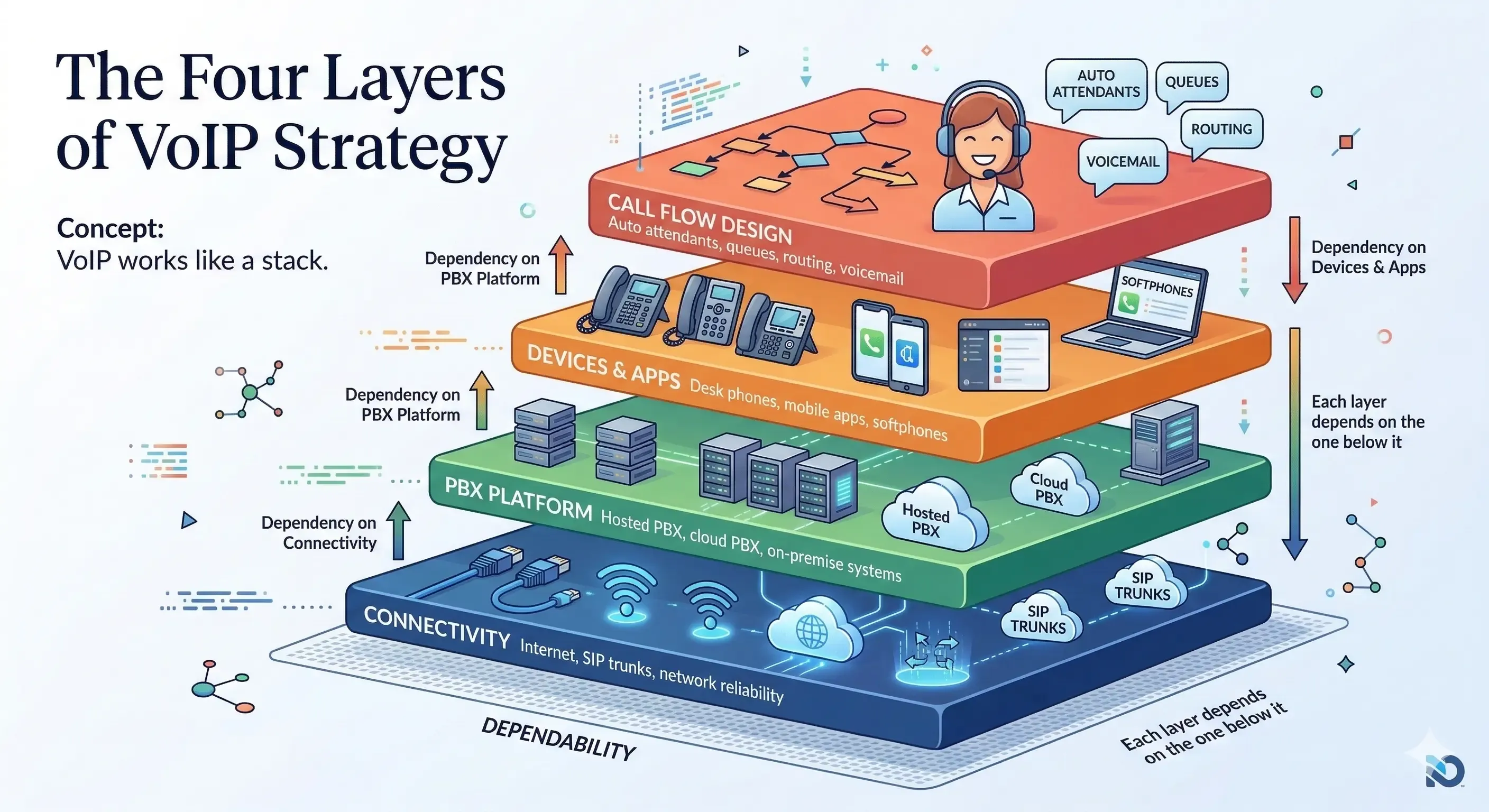
- Auto-Attendant: An automated receptionist that greets callers and directs them to the right person or department (“Press 1 for Sales, Press 2 for Support”). This ensures every call is answered promptly and professionally.
- Call Routing & Queues: Intelligently routes calls based on time of day, agent availability, or caller ID. Call queues hold callers in a virtual line, playing music or announcements, until an agent is free.
- Voicemail-to-Email (with Transcription): Sends an audio file and a text transcription of every voicemail directly to your email inbox, allowing you to read or listen to messages from anywhere.
- Mobile & Desktop Apps (Softphones): Turns any computer or smartphone into a full-featured business phone, allowing employees to make and receive calls with their business number from any location.
Tier 2: Productivity & Collaboration Features
These features streamline workflows and improve internal collaboration, especially for remote and hybrid teams.
- Video Conferencing: Integrated HD video and audio meetings with screen sharing, recording, and chat capabilities.
- Team Messaging: A persistent chat application for internal team communication, reducing email clutter and enabling quick collaboration.
- CRM Integration: Connects your phone system to your Customer Relationship Management (CRM) software (e.g., Salesforce, HubSpot). This enables screen pops (showing the caller’s record on an incoming call) and automatic call logging.
- Call Recording: The ability to record inbound and outbound calls for training, quality assurance, and dispute resolution.
Tier 3: Advanced & Customer-Facing Features
These features enhance your external image and provide valuable business intelligence.
- Advanced Call Analytics: A dashboard that provides deep insights into call volume, wait times, agent performance, and other key metrics.
- Toll-Free Numbers: 800-numbers that allow customers to call you for free, adding a layer of professionalism and national presence.
- Branded Caller ID: Allows you to display your company name and logo on outgoing calls, increasing answer rates by as much as 65% [3].
- Business SMS/MMS: Enables two-way text messaging with customers from your business phone number, a preferred communication channel for many consumers.
Part 4: The Pre-Flight Checklist — Technical & Implementation Readiness
Switching to VoIP is a straightforward process, but it requires some preparation to ensure a smooth transition. Use this checklist to assess your readiness.
1. Network & Bandwidth Assessment
Your internet connection is the foundation of your VoIP system. Poor internet quality will lead to poor call quality.
- Run a Business Internet Speed Test: Don’t use a consumer speed test. Use a business-focused test that measures latency (ping), jitter, and packet loss. For VoIP, you want:
- Latency (Ping): Below 60ms
- Jitter: Below 20ms
- Packet Loss: Below 1%
- Calculate Bandwidth Needs: Each simultaneous VoIP call requires approximately 100 kbps (0.1 Mbps) of both upload and download speed. A conservative estimate is to budget 0.2 Mbps per user. For a 25-person office, you would need at least a 5 Mbps symmetrical connection dedicated to voice, in addition to your data needs.
- Invest in a Business-Grade Router with QoS: Quality of Service (QoS) is a router setting that prioritizes voice traffic over other data (like streaming video or large file downloads). This is essential for maintaining crystal-clear call quality.
2. The Number Porting Process
Keeping your existing phone numbers is crucial. The process of moving them to a new provider is called “porting.”
- How Long Does It Take? The porting process is dependent on the losing carrier releasing the numbers. It typically takes 1-4 weeks. Do not cancel your old service until the port is confirmed complete.
- What is Required? You will need to provide your new provider with a signed Letter of Agency (LOA) and a recent copy of your phone bill from your current provider. The information (company name, address) must match exactly.
3. Hardware & Deployment
- Desk Phones vs. Softphones: Decide on your hardware strategy. Will employees use physical desk phones, or will they use the provider’s softphone apps on their computers and mobile devices? A mix is common.
- Staging & Provisioning: Your new provider should ship any physical phones pre-configured (provisioned) so they are plug-and-play. All you need to do is plug them into your office’s internet connection.
Part 5: The 10 Biggest Mistakes to Avoid When Buying
- Buying on Price Alone: The cheapest provider often cuts corners on support, reliability, or features, costing you more in the long run.
- Not Involving End-Users: Ask your team what they need. Your sales team might need CRM integration, while your support team needs advanced call queues.
- Ignoring the SLA: Don’t just assume reliability. Read the Service Level Agreement. A reputable provider will offer a 99.999% uptime guarantee and be transparent about service credits.
- Forgetting About Security: Ensure the provider offers encryption for all calls (TLS/SRTP) and complies with standards like HIPAA if you are in a regulated industry.
- Using Consumer-Grade Internet: A residential internet plan is not sufficient for a business phone system. You need a business-grade connection with a static IP and a strong SLA.
- Skipping the Free Trial: Never buy a system without testing it first. A free trial allows you to test call quality on your network and get a feel for the user interface.
- Not Reading Recent Reviews: Look for reviews on sites like G2, Capterra, and Trustpilot. Pay attention to comments about call quality, customer support, and billing.
- Choosing a System That Can’t Scale: Your phone system should grow with you. Ensure you can add and remove users easily without long-term contracts for each line.
- Overlooking the Mobile App: In a hybrid-remote world, the quality of the mobile app is paramount. It should have the same core functionality as the desktop app.
- Signing a Long-Term Auto-Renewing Contract: Be wary of multi-year contracts with steep early termination fees and automatic renewal clauses. Look for providers that earn your business every month.
Part 6: Your Final Action Plan — How to Make the Right Choice
You now have a comprehensive understanding of the technology, costs, and features involved in choosing a business phone system. It’s time to take action.
- Assemble Your Team: Involve key stakeholders from IT, finance, and operations in the decision-making process.
- Get Your Current Phone Bill: Gather a complete, recent copy of your phone bill, including all pages. This is the single most important document for calculating your potential ROI.
- Schedule a Professional Bill Review: The fastest, most accurate way to understand your potential savings is to have an expert analyze your current bill. They can identify the dozens of cryptic taxes, surcharges, and fees that are ripe for elimination.
By moving from an overpriced, inflexible legacy system to a modern, cloud-based VoIP platform, most businesses can expect to cut their telecommunication costs by 30-70% while gaining a powerful suite of productivity tools. The process starts with understanding what you’re really paying today.
Primary CTA: [Send Your Bill] – Get a free, no-obligation savings analysis and see your exact ROI.
Secondary CTA: Have questions first? [Book a 15-Minute Call] with a solutions expert.
References
[1] Fortune Business Insights. (2023). VoIP Market Size, Share & COVID-19 Impact Analysis. [2] National Center for Health Statistics. (2023). Wireless Substitution: Early Release of Estimates From the National Health Interview Survey, July–December 2022. [3] Hiya. (2024). State of the Call Report. [4] Telzio. (2026). VoIP Cost Savings: How Small Businesses Cut Phone Costs. [5] Phone.com. (2025). How Much Do Business Phone Systems Cost in 2025?.
Building a predictable revenue model?
I help technology leaders design scalable sales systems and turn communications platforms into profitable recurring services.
Work With Greg
Greg Steinig
Telecom & MSP Revenue Strategist
Greg Steinig is Vice President of Sales at SPARK Services and a longtime leader in the telecommunications and managed services industries. He previously served as Vice President of Sales at 3CX, where he helped scale annual recurring revenue from $20 million to $167 million. Greg writes and advises on VoIP strategy, MSP growth, and revenue systems for technology companies.
Learn more about Greg →